This was in path HKLM\Software\Microsoft\Communicator\Session Manager\Apps\27877e66-615c-4582-ab88-0cb2ca05d951
Changed the LiveServerIntegration key to 0 and it
Wednesday, April 21, 2010


Tuesday, April 13, 2010
How To: Enable "appear offline" status in Ms Communicator in VISTA
This status will fool your colleagues whereby they will assume you are out of office or offline but the fact is you are working or online on your system or machine. Have fun!!
Open Admin command prompt, type regedit and Enter

Open Registry Editor and go to the following registry entry
HKEY_LOCAL_MACHINE\SOFTWARE\Policies\Microsoft\Communicator
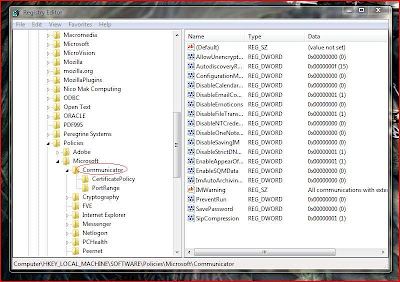
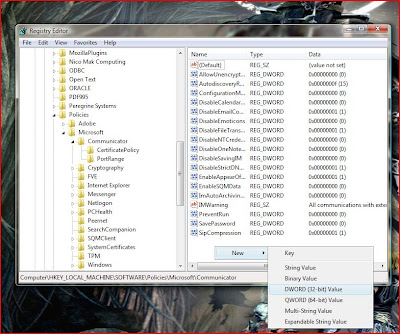
Right-click on the left panel, click New, select DWORD (32-bit) value
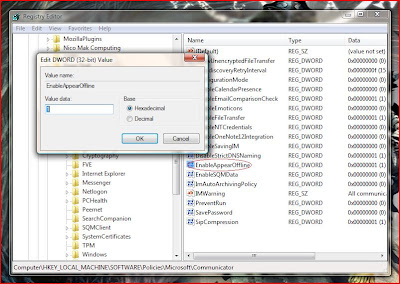
Rename the new string as "EnableAppearOffline" and press Enter. Double click on the string again and set Value data as "1" , set base value as Hexadecimal

Open Admin command prompt, type regedit and Enter

Open Registry Editor and go to the following registry entry
HKEY_LOCAL_MACHINE\SOFTWARE\Policies\Microsoft\Communicator

Right-click on the left panel, click New, select DWORD (32-bit) value

Rename the new string as "EnableAppearOffline" and press Enter. Double click on the string again and set Value data as "1" , set base value as Hexadecimal


Press F5 and close the Regisrty Editor. Open Ms Communicator and the offline option will be visible.
Subscribe to:
Posts (Atom)